IAM and RBAC overview
You need the admin rights to use this feature.
KAIZEN’s Identity and Access Management (IAM) framework is based on Role-Based Access Control (RBAC), covering the configuration of user domains, role assignment, privilege definition, and secure management of access to endpoint resources.
The RBAC model supports dynamic role and privilege assignments, enabling administrators to implement fine-grained access control. By defining privileges and mapping them to specific resources, the system enforces the principle of least privilege in accordance with security best practices. This approach ensures scalable, efficient, and secure user access management aligned with organisational requirements.
IAM configuration through Access Controller
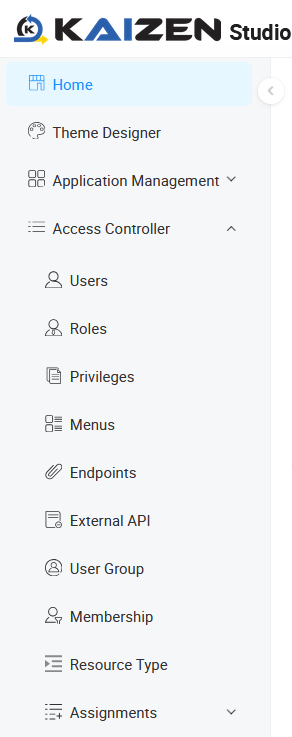
KAIZEN’s IAM capabilities are available through the Access Controller menu. Access to this menu is restricted to users with the appropriate administrative role assigned to their account. The IAM capabilities are fully configurable at runtime and apply directly to deployed applications.
IAM configuration through Studio Console
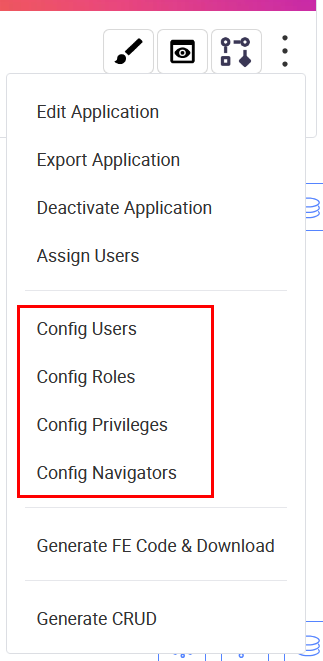
In addition, KAIZEN supports IAM configuration during the design phase at the application level through the Studio Console. This enables developers to define and manage access control settings as part of the application build process, ensuring security is embedded from the outset. For more information on designing IAM at the application level, refer to the Application-level IAM configuration articles.
Access control hierarchy
Access control follows a clear hierarchy, which determines how permissions are granted from the highest level down to individual resources. The relationship follows this hierarchy:

-
User Domain: The top-level security boundary that groups users and roles for a specific context, like an "Internal Staff Portal" versus a "Public Customer Portal." It isolates security rules between different groups.
-
User: An individual who logs into the system. Each user is assigned one or more roles.
-
Role: A collection of permissions that represents a job function, such as "Administrator," "Editor," or "Viewer." Roles define what a user is allowed to do.
-
Privileges: These are the specific, granular permissions assigned to a role. For example, a privilege might be
can_view_reportsorcan_delete_users. -
Resources: These are the actual assets in the application that the user are securing.
-
Pages: Assign a specific privilege to each page. Only users whose role contains that privilege will be able to view or access the page.
-
API Endpoints: Access to backend data and functions is secured by assigning privileges to API endpoints. This prevents users from performing unauthorised actions, like creating or deleting data.
-
Navigator Menus: The navigation links a user sees can be controlled by privileges. This ensures users are only shown links to the pages and features they are authorised to access.
-
By leveraging KAIZEN’s granular IAM system, you can build secure applications that safeguard data and ensure users only access features relevant to their assigned roles. With built-in customisable security access controls, you can focus on application design and functionality, without the need to manually develop complex authorisation mechanisms.
Last updated on 20 May 2026