Customise user privileges
You need the admin rights to use this feature.
In KAIZEN, privileges represent the most detailed level of access control within the Identity and Access Management (IAM) framework. They serve as specific, individual permissions that control precisely which actions a user can perform and which system resources they are allowed to interact with.
- A role can contain multiple privileges that define the permitted operations.
- Privileges enable fine-grained control over application features and functionality.
- Privileges can be mapped to roles, endpoints, menus, and pages. Users assigned to roles with the corresponding privileges are granted access to the associated menus, pages, and endpoints accordingly.
- Admins can create and manage privileges as required, assign them to roles and system resources, and export or import privilege configurations for backup or migration purposes.
Manage the privileges
To manage the privileges, perform the following:
-
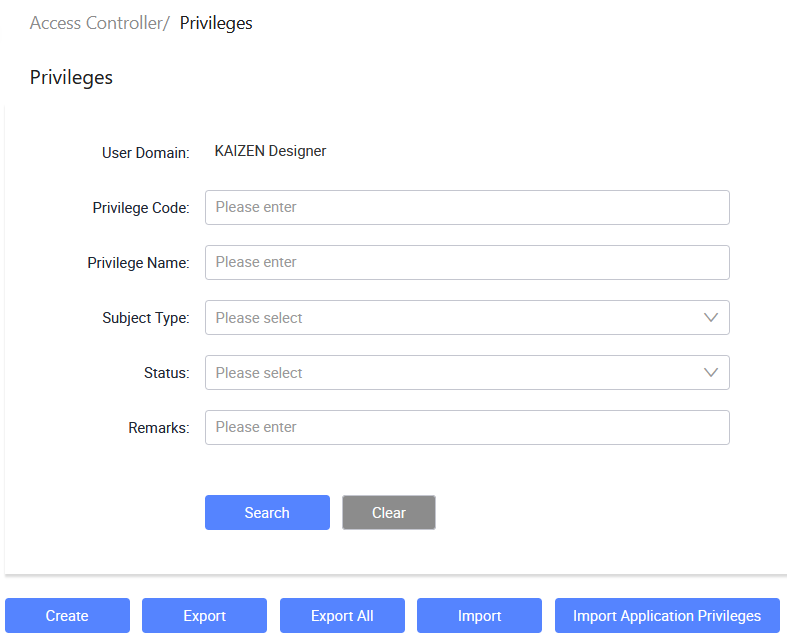
In the KAIZEN studio console, on the left panel, click Access Controller > Privileges.
The Access Controller/ Privileges page displays.
-
From here, you can create new privileges, import or export privileges, import application privileges and so on.
Create a custom privilege
-
In Access Controller/ Privileges, click Create.
-
In the Create Privilege window, enter the privilege information in these fields and click Save.
Last updated on 20 May 2026