Manage memberships
You need the admin rights to use this feature.
Memberships define the relationship between users and user groups. Each membership record assigns a user to a specific user group, enabling administrators to organise users into logical groups for collective management.
- A user can belong to multiple user groups through separate membership records.
- A membership can designate a user as a Group Admin, granting them administrative control over the user group.
- Memberships work together with user groups to simplify task routing in workflows, where tasks can be assigned to a group rather than to individual users.
Administrators can create and manage memberships as required, and export or import membership configurations for backup or migration purposes.
Manage the memberships
To manage the memberships, perform the following:
-
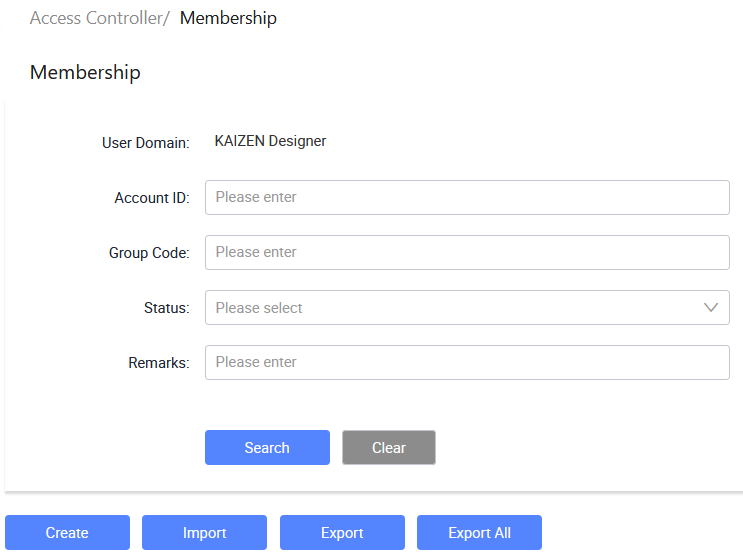
In the KAIZEN studio console, on the left panel, click Access Controller > Membership.
The Access Controller/ Membership page displays.
-
From here, you can create new memberships, import or export memberships, and so on.
Create a membership
-
In Access Controller/ Membership, click Create.
-
In the Create Membership window, provide the details:
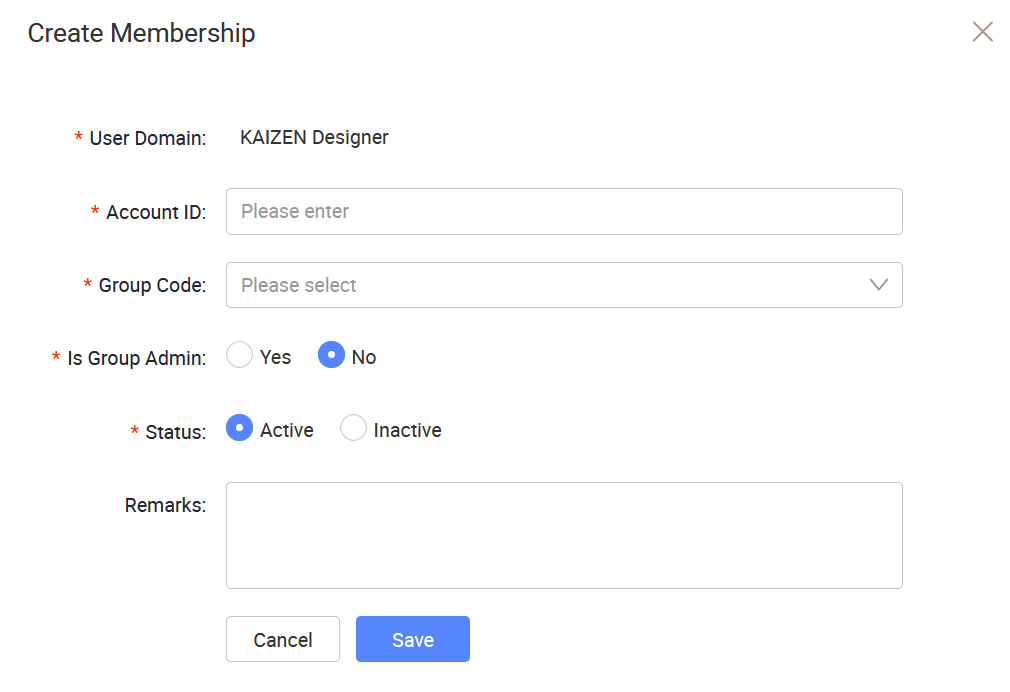
The following table describes each field from the window above:
Field Required Description User Domain Yes Displays the user domain for the membership. Account ID Yes Enter the account ID for the membership. Group Code Yes Select the group code to assign the membership to. Is Group Admin Yes Sets whether the member is a group administrator. Status Yes Sets the status of the membership. Remarks No Enter optional remarks or notes for the membership. -
Click Save.
Last updated on 20 May 2026