Manage data types
While the Database Designer defines the physical data model (how data is stored), data types define the logical data model. It is the structure of data as it moves through the application APIs.
A data type is a reusable data structure, created in the Service Designer, that becomes a Value Object (VO) in the generated Java code. Its primary role is to define the expected structure of data for API calls, most commonly for the request body of a POST or PUT endpoint. This ensures that data sent to the application is consistent and correctly formatted.
Add a new data type
To add a data type, perform the following:
-
In the Setting panel of the selected service, click the + sign at the Data Type dropdown.
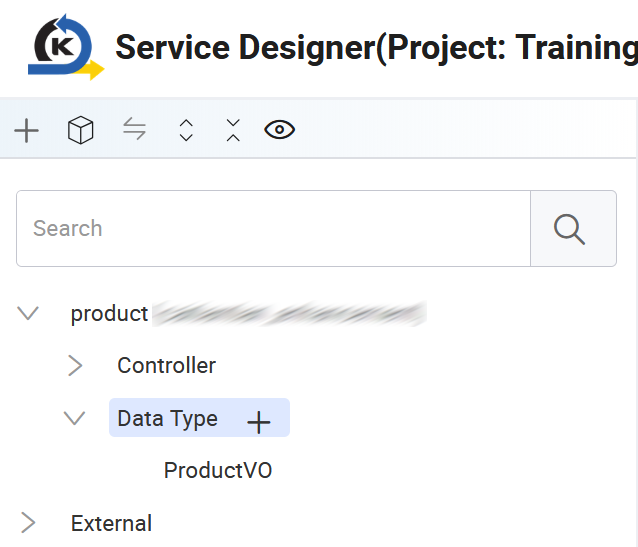
The Add Data Type window appears in the Configuration panel.
-
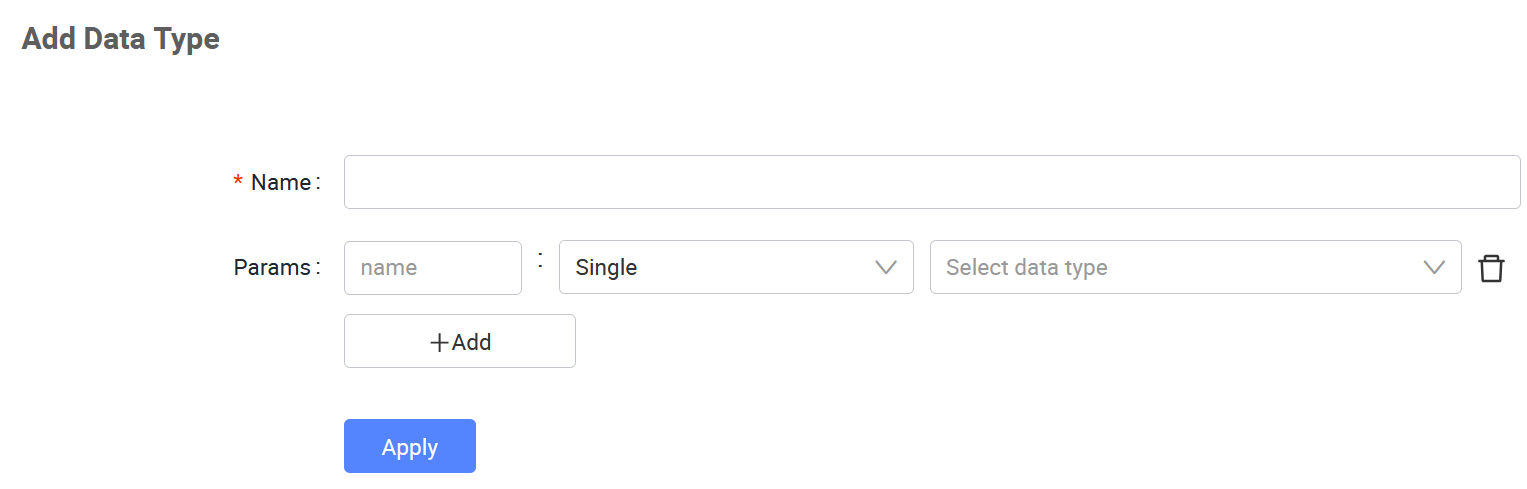
Fill in the following details:
-
Name: A descriptive name for the data type, typically ending with
VO(e.g.,ProductVO). -
Params: Use the Add Parameter button to define each field (attribute) that will be part of this data structure. For each parameter, specify the following:
-
Name: The name of the field (e.g.,
nameorprice). -
Type: The data type of the field, such as Single, List, or Array.
-
Data Type: The specific type of data, e.g., String, Integer, or Boolean.
-
-
-
Click Apply to save the new data type. It will then be available for use in any datasource configuration within this service.
Edit an existing data type
You can update a data type as the application's requirements change. For example, you can add a new field or change an existing one.
To edit a data type, perform the following:
-
In the Configuration panel, find the Data Types section.
-
Click the data type name. The Edit Data Type window appears, where you can add, remove, or modify the existing parameters.
-
Click Apply to save the updated data type.
Last updated on 20 May 2026