Manage external APIs
You need the admin rights to use this feature.
External API management lets administrators make external datasources available in Runtime. After the external configuration is published from Designer and imported into Runtime, applications and services can invoke third-party APIs through KAIZEN Gateway using the configured provider, environment, authentication, and datasource settings.
Use an external datasource in Runtime
Before using an external datasource in Runtime, publish the external configuration from App Designer to the target Runtime environment. Refer to External API integration on how to configure an external API.
-
Export the external configuration
XMLfile from Service Designer. -
Import the
XMLfile in the Access Controller > External API page. -
Confirm that the provider, environment, authentication, and datasource are all Active.
-
Assign datasource invocation permission to the target application or service.
Custom backend services must call KAIZEN Gateway instead of calling the third-party API directly. Send a POST request to the following endpoint:
/bridge/{datasource-identity}
For example, call a datasource with the identity tlsVersionCheck:
POST /bridge/tlsVersionCheck
Request headers include:
Provider-Name:tls-testContent-Type:application/json
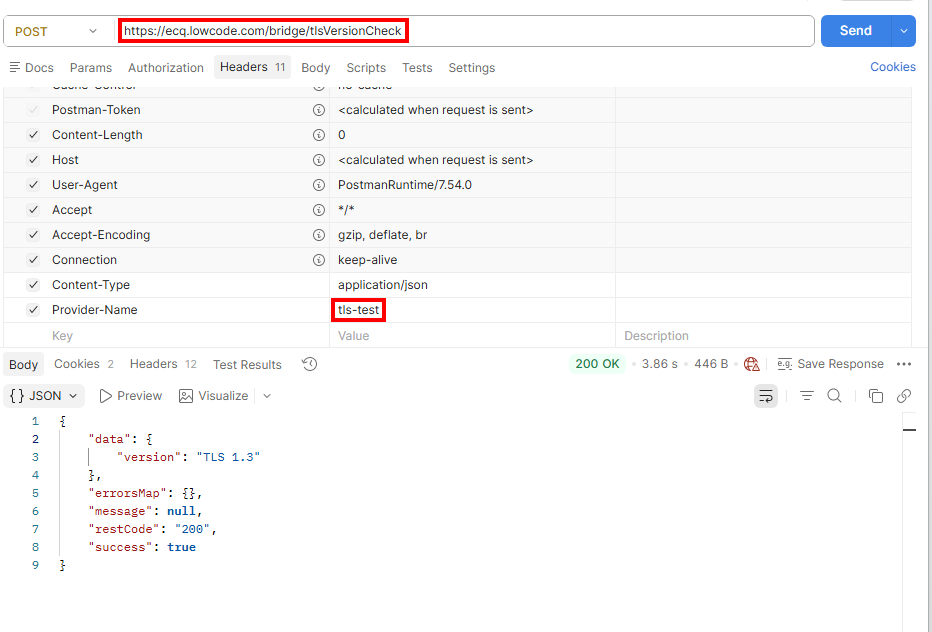
To send the request in Postman:
-
Set the method to
POST. -
Set the URL to
https://ecq.lowcode.com/bridge/tlsVersionCheck -
Add the following header:
Provider-Name:tls-test
-
Leave the body empty, or provide JSON that matches the datasource configuration.
KAIZEN Gateway performs the following steps:
-
Find the external datasource configuration using
Provider-NameanddsIdentity. -
Build the external API URL from the environment base URL and datasource path.
-
Add authentication information according to the authentication configuration.
For
NO_AUTH, Gateway does not add an authentication header or query parameter. -
Forward only the request fields permitted by the datasource configuration.
-
Return the external API response in the KAIZEN response format.
HTTPS and TLS
The TLS protocol version is negotiated between the WebClient used by Gateway and the external API endpoint. If both the runtime and the external endpoint provide support, TLS 1.3 can be negotiated.
KAIZEN External Datasource does not provide a datasource-level switch to force outbound calls to use TLS 1.3 only. This article uses https://www.tlsversion.com/v1/version.json as the test endpoint and checks the negotiated result through the version field in the response.
Last updated on 21 Sep 2026