Import or export a service
Exporting a services helps you save the configuration of its API endpoints in an XML file, while importing a service helps you apply the API endpoint configuration to another project.
Export a service
To export a service, perform the following:
-
In Service Designer, find the service you want to export.
-
Select the service and click Export Service.

-
The Export Service window pops up, asking for confirmation. Click OK.
A file in
XMLformat will be downloaded in your browser.
Import a service
To import a service from an existing XML file, perform the following:
-
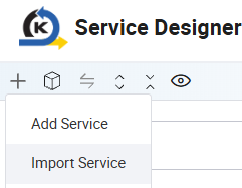
In Service Designer, click the + sign and select Import Service. The File Explorer window opens.
-
Browse to the service file in
XMLformat. Click Open. The Import Service window displays. -
Select the branch for Git version control purposes. Click Import.
A message will pop up, showing the import is successful.
Last updated on 20 May 2026