Generate the backend code
Generating backend code in KAIZEN streamlines your development of robust server-side applications by transforming your user-defined configurations into structured Java code, such as Value Objects (VO) and application properties. This automated approach improves your productivity by reducing manual coding effort, minimising human errors, and ensuring compliance with established best practices and architectural standards.
With the generated foundation in place, you can seamlessly incorporate your business logic, implement data access layers through DAOs, and manage application configurations within a consistent and scalable architecture. By leveraging KAIZEN’s code generation capabilities, you can accelerate your backend development cycle, streamline your workflow, and focus on delivering high-quality, business-driven solutions.
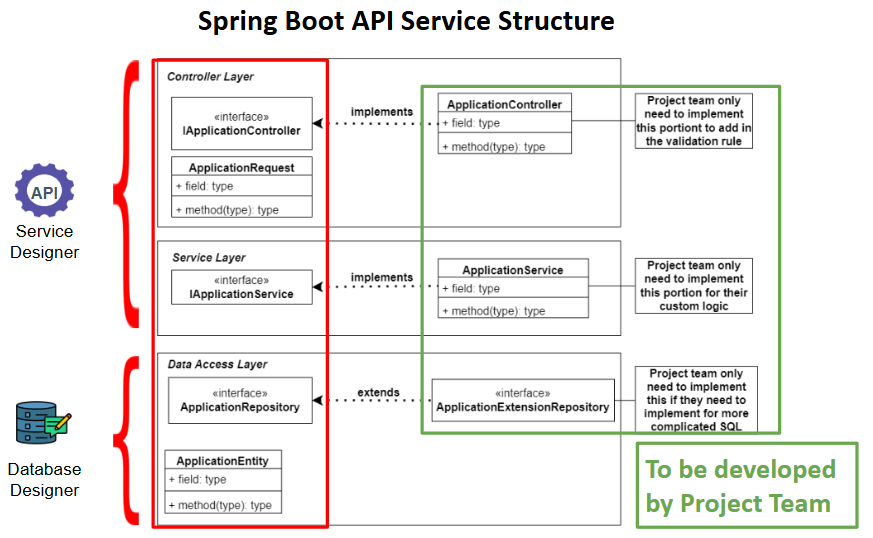
The backend skeleton code generated by KAIZEN consists of the interfaces highlighted in red. You will implement your custom business logic in the components highlighted in green, extending the generated framework according to your project requirements.
When generating CRUD code, KAIZEN automatically includes and displays relational table fields. Foreign key relationships defined in your physical model are reflected in the generated data access and service layers without additional configuration.
Generate BE code & download
The Generate Source Code feature provides the option to create the complete Spring Boot project for the microservice and download it as a zip file. This feature is intended for local development, debugging, and manual codebase management.
You can generate the code for your application backend and download it in the Service Designer.
In Service Designer
-
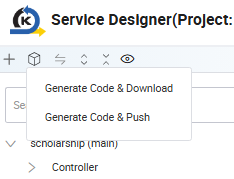
In the Service Designer, navigate to the top left panel. Click Generate Code & Download.
-
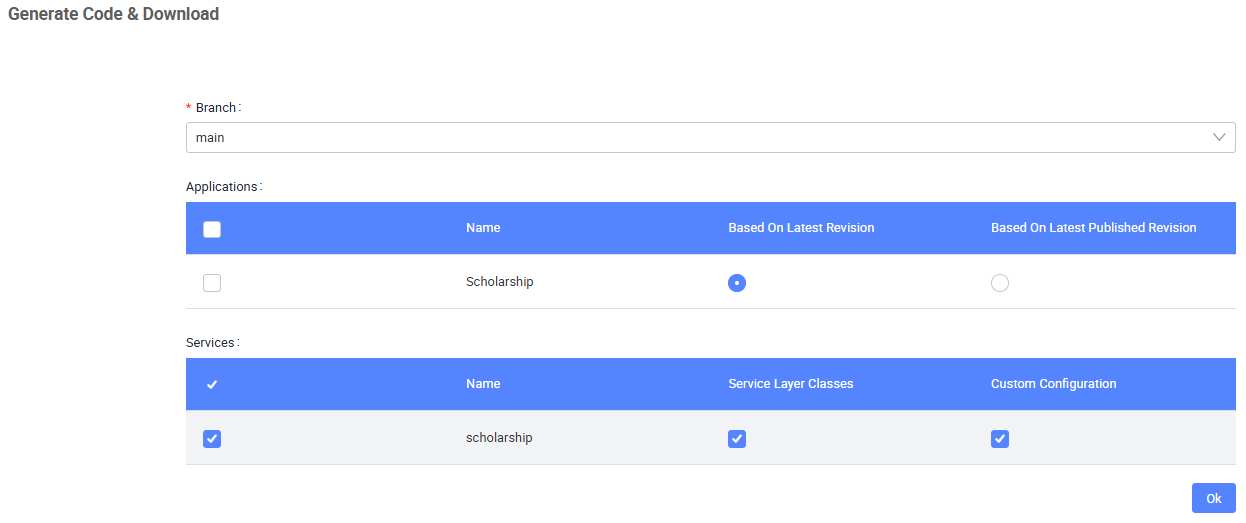
In the Generate Code & Download window, provide the following:
-
Specify the branch to take from.
-
Select the frontend application (you may also generate code for your frontend applications through the Service Designer).
-
Select the backend service (e.g., "Services:
scholarship").-
Be sure to select the Service Layer Classes option, if you want KAIZEN to create the basic service classes.
-
Be sure to select the Custom Configuration option, if you want to generate the files for the IAM configurations you have designed for your application. For more information on IAM configurations, refer to IAM and RBAC overview.
-
-
-
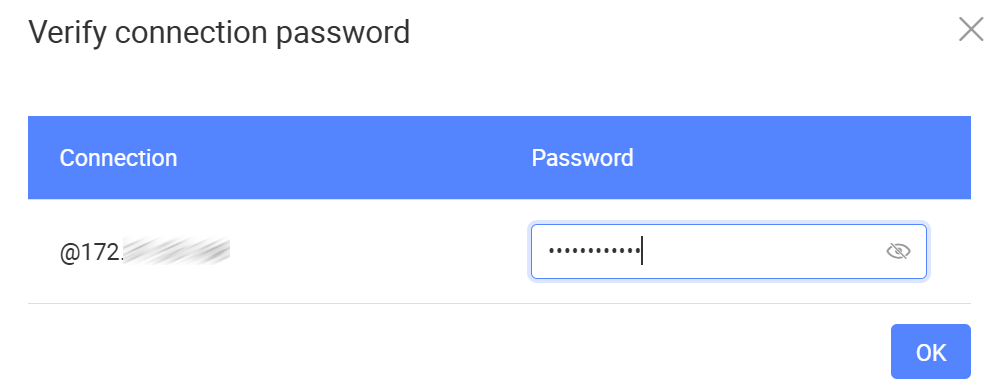
Click OK. If you configured your database in your service, a window will appear for you to input your database connection password.
-
Click OK. A zip file containing the complete Java source code for the service will be downloaded.
Generate BE code & push
The automated Git Push feature is essential for a CI/CD pipeline, streamlining the development and deployment process. Similarly, this feature also generates the backend code, then automatically commits and pushes the changes to the connected Git repository.
You can generate the code for your application backend and push it to the connected Git repository either at the project level or in the Service Designer.
At the project level
The Push Project option on the project toolbar will commit and push your project applications' FE and BE code into the target branch of your repository. For more details, refer to Push project.
At the service level
-
Use one of the following methods to open the Generate Code & Push window:
- In Service Designer toolbar
- From the Manage Branch button
In the Service Designer, navigate to the top left panel. Click Generate Code & Push.
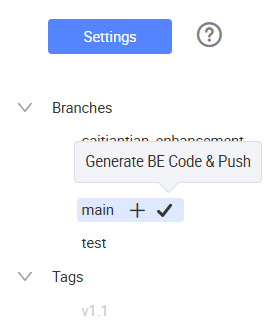
Alternatively, in Service Designer, select the service, click the Manage Branch button
 . The Manage Branch window opens.
Select the target branch from the Branches dropdown. Click the Generate BE Code & Push button.
-
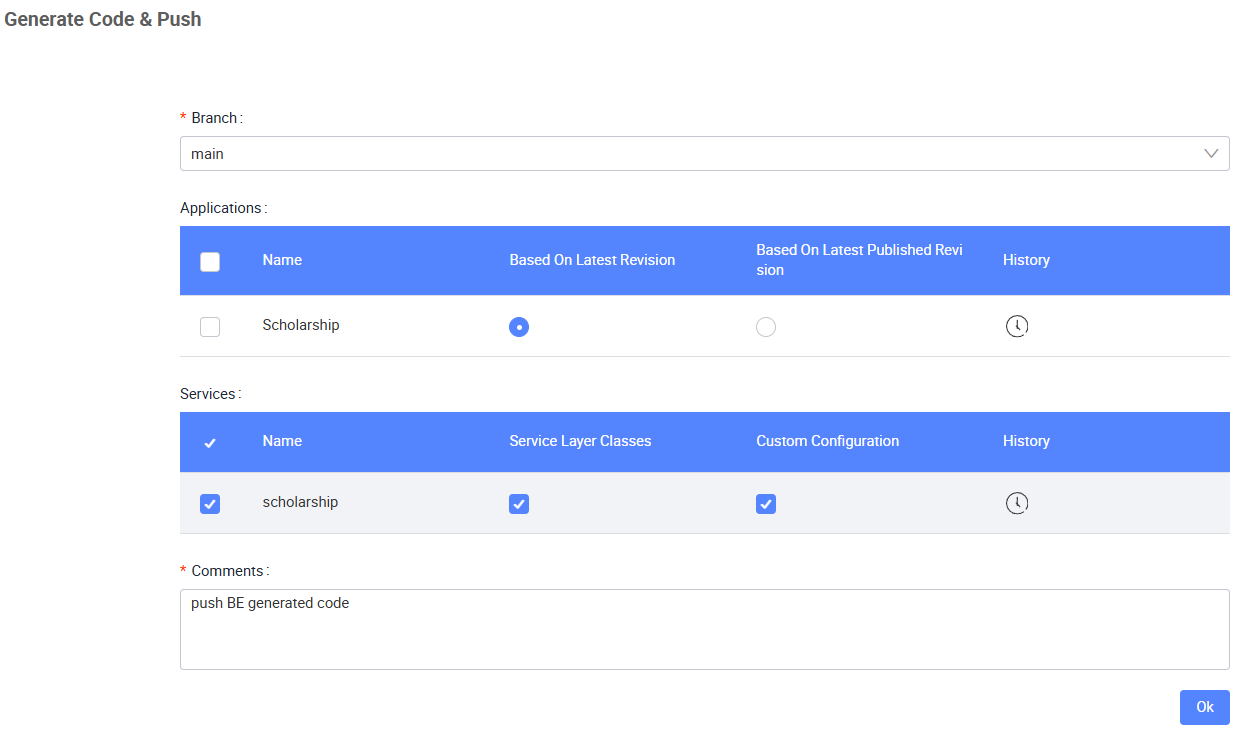
In the Generate Code & Push window, provide the following:
-
Specify the branch to take from.
-
Select the frontend application (you may also generate code for your frontend applications through the service designer).
-
Select the backend service (e.g., "Services: scholarship").
-
Be sure to select the Service Layer Classes option, if you want KAIZEN to create the basic service classes.
-
Be sure to select the Custom Configuration option, if you want to generate the files for the IAM configurations you have designed for your application. For more information on IAM configurations, refer to IAM and RBAC overview.
-
-
Write a commit message to describe the code changes under Comments.
noteApplications that do not have a matching branch are not selectable as push destinations. Make sure the target application has the same branch before pushing.
-
-
Click OK to start the process. KAIZEN will generate the code and push it to the current active branch in the Git repository.
To view commit history, refer to View commit history.
Understanding generated backend code structure
In KAIZEN, the backend code is often auto-generated to streamline development. However, understanding the structure of this generated code is crucial for customisation, debugging, and integrating new features. The backend typically includes components like controllers, services, repositories, and models, each serving a specific role in handling API requests, business logic, and database interactions. By familiarising yourself with this structure, you can make targeted modifications, optimise performance, and ensure the backend aligns with your application's requirements.
Directory structure
The generated backend code is organised into a clear directory structure to manage different functionalities efficiently. Common folders include:
-
Controllers: These handle incoming API requests and map interactions between the frontend and backend. Controllers can be customised to change specific API behaviors based on your application's needs.
-
DAO (Data access object): These are responsible for managing database interactions, using auto-generated methods to access and manipulate data. Repositories can be customised to add complex queries or optimise performance.
-
Models and entities: Models represent your application's data and map directly to database tables. You can modify them to include additional fields or relationships, aligning with evolving business requirements.
-
Services: Services manage the core business logic and interact with controllers. They encapsulate reusable logic and can be extended or modified to introduce additional functionality.
-
Configuration: The configuration files in the generated backend code are essential for managing environment-specific settings like security, database connections, and API credentials.
The following shows an example of a directory structure of the generated code:
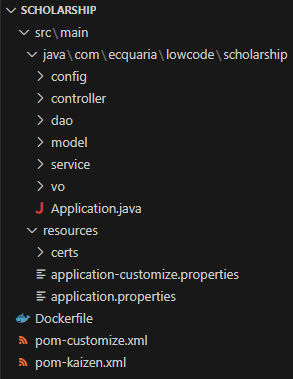
The following table lists out the important files in the generated code:
| File Name | Description |
|---|---|
application.properties | Default application configuration settings. |
application-customize.properties | A separate properties file for custom configurations without modifying defaults. |
pom-kaizen.xml | The primary Maven configuration file for the server module. |
pom-customize.xml | A customisable Maven file to override dependencies or configurations. |
Last updated on 20 May 2026