Module 1. Introduction and architecture
Welcome to the KAIZEN Express Training Guide. This guide is designed specifically for your evaluation trial. Instead of requiring you to build an application from scratch, we have provided a fully realised, pre-populated reference application.
Your goal in this training is to act as an inspector—exploring the pre-built components, tracing the logic, verifying how KAIZEN's visual tools align with your organisation's business needs, and inspecting how standard, clean generated code can be easily extended using standard developer tools.
1.1 Introduction to Express Training
Goal
Understand how to access and navigate your pre-populated reference application to verify KAIZEN’s fitness for your business requirements.
Accessing Your Reference Application
To make your evaluation as smooth as possible, we have already set up a dedicated training environment for you:
-
Your Training Organisation: A unique training organisation has been created for your company, following the naming convention:
[yourcompanyname]-training-org(for example, if your company name is TOPPAN Ecquaria, your organisation will betoppan-ecquaria-training-org). -
Finding the Application:
-
Log in to KAIZEN Cloud and land on the main Console Home Page at https://studio.onekaizencloud.com
-
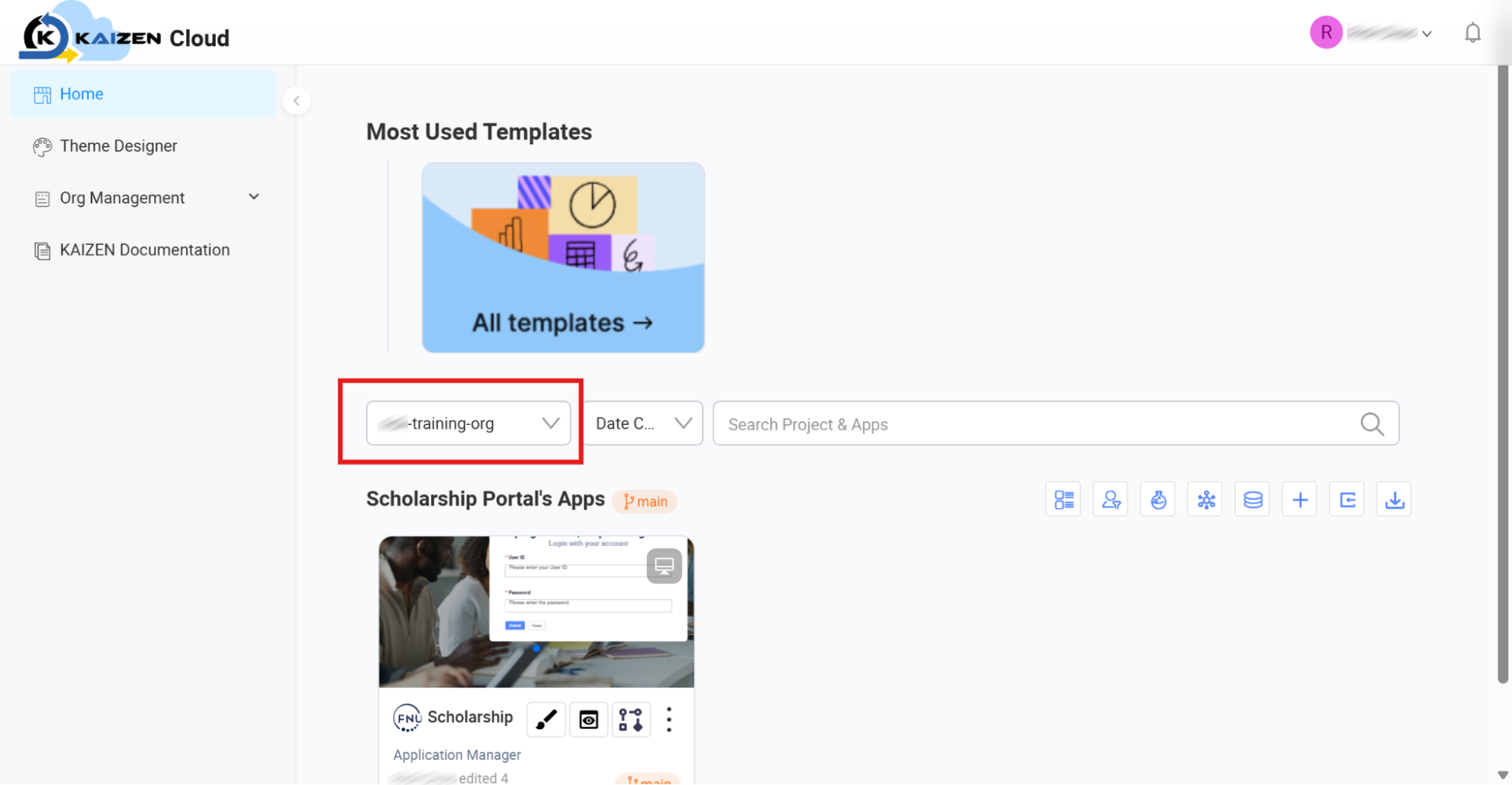
Locate the organisation dropdown selector in the centre of the console shown below.
-
Select your company's designated training organisation from the dropdown list.
-
Once selected, you will instantly see your pre-built reference application loaded on your screen and ready to inspect.
-
Concept: The "Inspection Tour" Approach
Traditional software trials often require you to spend hours reading documentation, setting up environments, and typing boilerplate code just to see a basic form work. KAIZEN takes a different approach.
We have pre-loaded a fully functional, comprehensive reference application directly into your trial workspace. This application features:
- A responsive user interface with interactive forms and pages.
- A multi-step visual business workflow with conditional routing.
- A structured relational database with pre-seeded data.
- Visually configured REST API endpoints with fully inspectable, standard generated code.
As you move through this guide, you will peek behind the curtain. You will see how these components were configured visually, examine how the underlying generated code is structured, and learn how developers can seamlessly extend the application with custom programming in their favourite IDE.
1.2 Evaluation Criteria
Goal
Define what "success" looks like for your Proof of Value (PoV) evaluation.
Concept: Aligning KAIZEN to Your Business
To maximise the value of your trial, we recommend focusing your evaluation on three primary pillars:
1.2.1 Functional Requirements Alignment
As you explore the pre-built application, ask yourself:
- UI Flexibility: Does the App Designer offer the visual components (inputs, tables, buttons) needed to support our user experiences?
- Process Automation: Can the Workflow Designer accommodate our real-world approval chains, business rules, and routing conditions?
- Data Integration: Can the Service Designer easily represent our existing data models and connect with our current systems?
1.2.2 Visual Development Speed & Maintainability
Assess the ease of making modifications:
- Low-Code Customisation: How straightforward is it to change a colour theme or alter a form layout without deep software engineering skills?
- No-Code Process Changes: Can a business analyst easily modify a routing rule in the visual workflow editor?
1.2.3 No Vendor Lock-In & Code Extensibility
Verify how KAIZEN bridges the gap between visual design and pro-code development, respecting standard developer practices:
- Frontend Flow (1-Way Visual Generation): Understand that the App Designer is the absolute source of truth for UI layouts, generating clean frontend code. This one-way generation prevents layout drift and ensures design integrity.
- Backend Flow (Git Commit/Push Sync): Inspect the generated backend interface files. See how a developer can pull this generated codebase, open the project folder in their local IDE (such as VS Code), write custom implementations of those interfaces, and commit and push their changes back to sync seamlessly with the environment.
1.3 Application Architecture
Goal
Visualise how a full-stack KAIZEN application is structured, how its key components work together, and how visual designs map to readable code.
Concept: Separation of Design and Runtime
To evaluate KAIZEN accurately, it is helpful to separate the tools you use to build the application (Design-Time) from the actual architecture of the running application (Runtime).
The following architecture diagram details this relationship, showing how your visual designs compile into a high-performance, standard runtime stack.
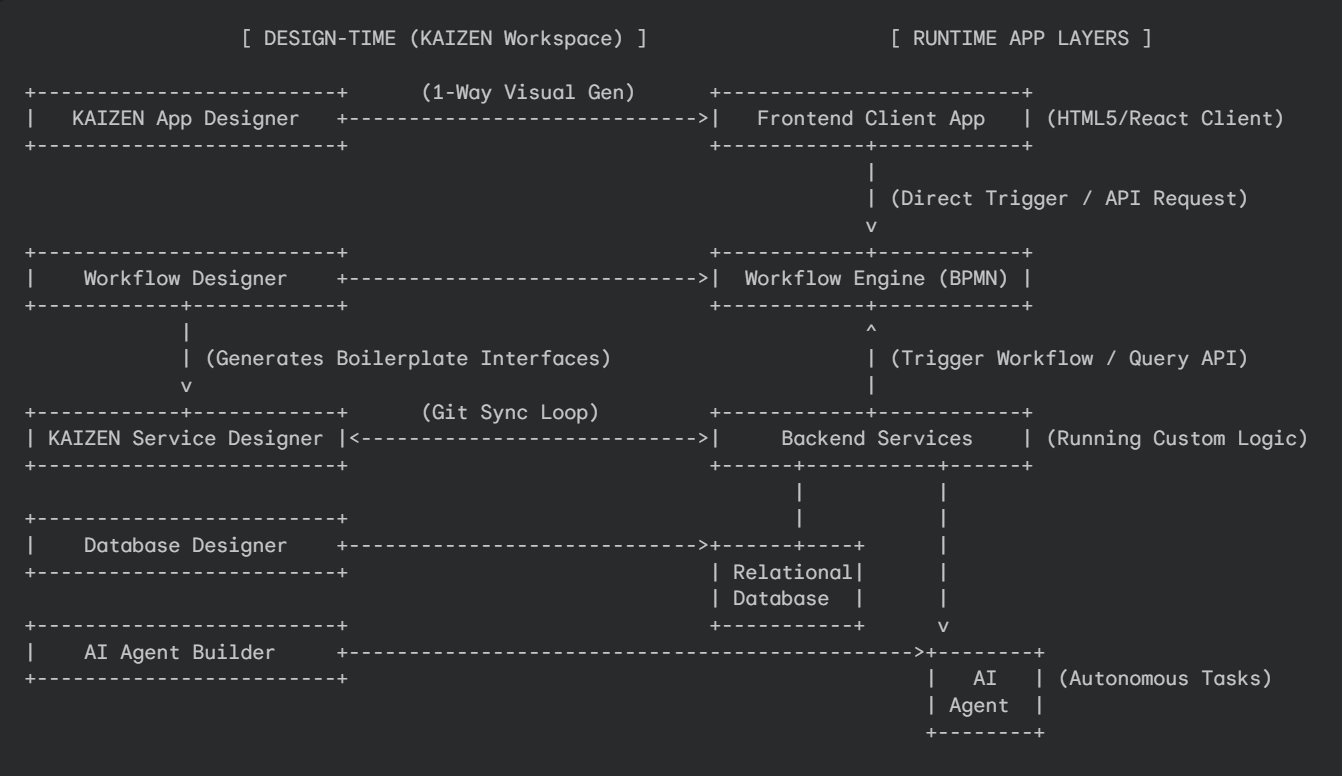
The Design-Time Workspace (Left Column)
-
App Designer (UI Tool): A visual drag-and-drop workspace used to build forms, pages, and interactive UI states. Layout generation is a one-way process directly from this designer to ensure visual integrity.
-
Workflow Designer (Process Tool): A BPMN 2.0 visual canvas used to define business paths, approval steps, routing logic, and task queues.
-
Service Designer (API Tool): A visual editor to configure APIs, request/response models, and custom hooks. This layer automatically generates standard boilerplate code and interface files.
-
Database Designer (Data Tool): A visual interface used to model physical SQL relational schemas, database tables, and key relationships.
-
AI Agent Builder (AI Tool): A visual studio used to configure system prompts, agentic workflows, memory, cognitive limits, and tool execution logic.
The Runtime Execution Layers (Right Column)
-
Frontend Client App: The compiled responsive web interface running inside the user's browser.
-
Workflow Engine: The server-side orchestrator running the BPMN workflows. Workflows can be triggered directly via frontend user actions or programmatically by backend scripts.
-
Backend Services: The running API server containing KAIZEN's compiled code along with the developer's custom logic. This layer is fully extensible; a developer can open the generated folder structure in VS Code, implement the visual-to-code interfaces, and commit their code back to git to sync.
-
Relational Database: The secure, transactional SQL database storing the application's underlying tables and operational data.
-
AI Agent: The active autonomous software agent instances that execute the prompt structures, tools, and actions defined in the AI Agent Builder.
Last updated on 21 Sep 2026