System setting
You need the admin rights to use this feature.
System Setting allows administrators to manage key-value configuration entries used by KAIZEN system functions and application services. Each setting contains a config name, config key, config value, and optional remarks to describe its purpose.
Administrators can create, search, view, and edit system settings as required. Use this feature carefully because changes to system settings might affect the entire platform behaviour.
Manage the System Setting
To manage the System Setting, perform the following:
-
In the KAIZEN studio console, on the left panel, click System Configuration > System Setting.
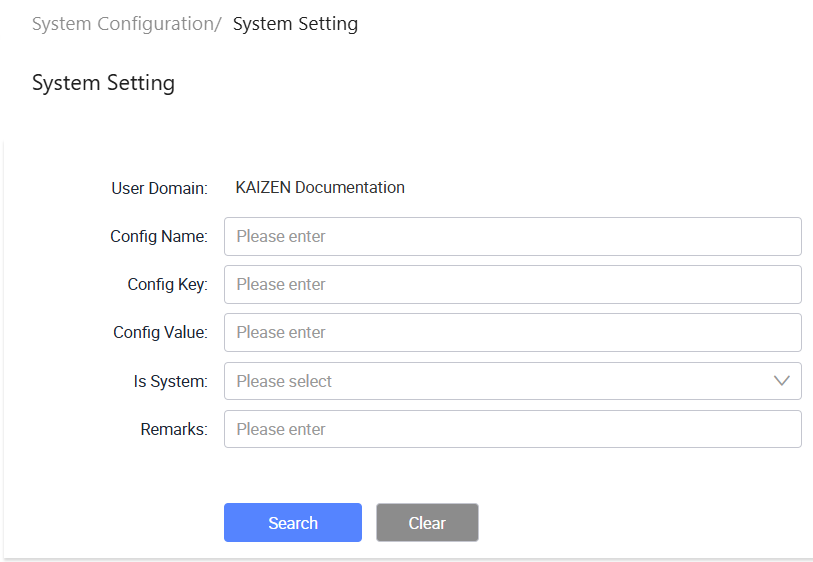
The System Configuration/ System Setting page displays.
-
From here, you can create new system settings, search for existing settings, view setting details, and edit settings. Each row in the table provides the following actions under the Actions column:
- View: Opens the system setting details in read-only mode.
- Edit: Opens the system setting details for editing.
Create a System Setting
To create a System Setting, perform the following:
-
In System Configuration/ System Setting, click Create.
-
In the Create System Config window, provide the details:
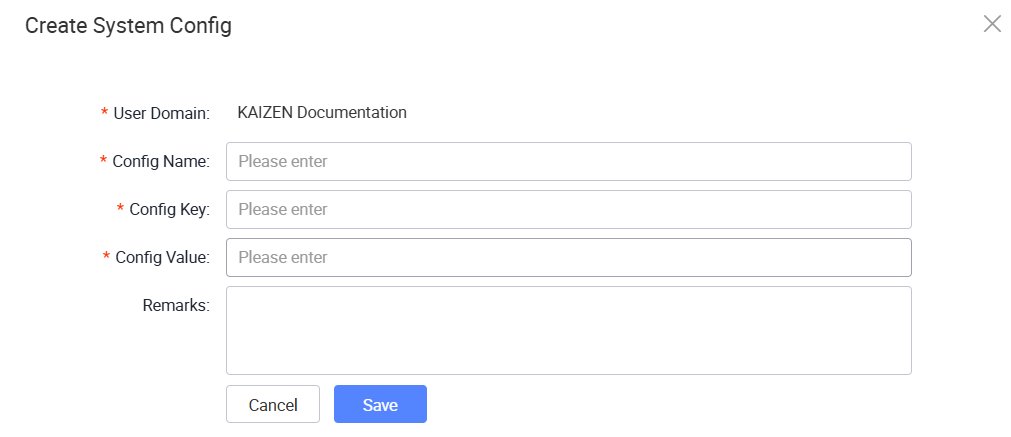
The following table describes each field from the window above:
Field Required Description User Domain Yes Displays the user domain for the system setting. Config Name Yes Enter the display name of the system setting. Config Key Yes Enter a unique key to identify the system setting. Config Value Yes Enter the value for the system setting. Remarks No Enter optional remarks or notes for the system setting. -
Click Save.
Search System Setting
To search for System Settings, perform the following:
-
In System Configuration/ System Setting, enter or select the search criteria.
Field Description User Domain Displays the user domain for the current session. Config Name Search for system settings by config name. Config Key Search for system settings by config key. Config Value Search for system settings by config value. Is System Filter system settings by whether they are system-defined settings. Remarks Search for system settings by remarks or notes. -
Click Search to find the result.
Last updated on 21 Sep 2026