Import or export a library
Importing external JavaScript libraries (such as uuid or lodash) extends the platform's functionality. Once you define the package name, version, and URL in the Libraries panel and import the external library, these functions are available globally across your application. This helps you perform complex data manipulation or ID generation without writing utility functions from scratch.
Exporting libraries makes it easy to manage the packages and migrate them into a different version of KAIZEN or even an external system.
Export libraries
To export libraries, perform the following:
-
In App Designer, on the top left, click Libraries.

-
From the Libraries panel, click Download.
-
The Download Assets window opens, asking for confirmation. Click OK.
A
JSONfile containing necessary information of all the packages in your library will be downloaded in your browser.
Import a library
From a JSON file
To import a library from an existing JSON file, perform the following:
-
In App Designer, on the top left, click Libraries.
-
From the Libraries panel, click Upload. The File Explorer window opens.
-
Browse to the
JSONfile. Click Open.A message will display, saying your application is updated successfully.
-
The Reload Site window opens, asking for confirmation. Click OK to view the changes.
From a URL
To import a library from a URL, perform the following:
-
In App Designer, on the top left, click Libraries.
-
From the Libraries panel, click Add. The Add Library window opens.
-
Fill in the mandatory fields including package name, version, URL, and library name. If needed, provide details in the optional field by specifying whether it is a material package. Click Save.
-
The Reload Site window opens, asking for confirmation. Click OK to view the changes.
Update an existing library
Update lodash in KAIZEN 5.3.0
From KAIZEN 5.2.0 to 5.3.0, update the existing lodash entry in the Libraries panel. Lodash version 4.17.21 is replaced by version 4.18.1 in KAIZEN 5.3.0.
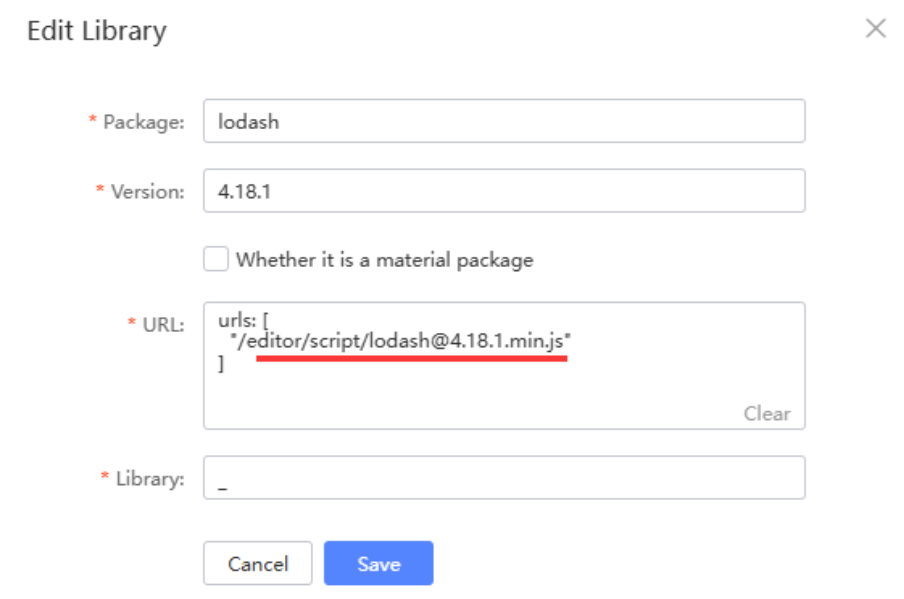
To update lodash, perform the following:
-
In App Designer, click Libraries
 .
. -
Select the
lodashlibrary and click Edit. -
Update the library details as follows:
Field Value Package lodashVersion 4.18.1URL /editor/script/lodash@4.18.1.min.jsLibrary _ -
Click Save.
-
In the Reload Site window, click OK to apply the changes.
Last updated on 21 Sep 2026