Message transaction
You need the admin rights to use this feature.
Message transactions allow administrators to review notification messages sent by KAIZEN. Use this page to search email and SMS message transactions, check whether a message was sent or failed, and view the transaction details.
Manage the message transactions
To manage message transactions, perform the following:
-
In the KAIZEN studio console, on the left menu, click Notification > Message Transaction.
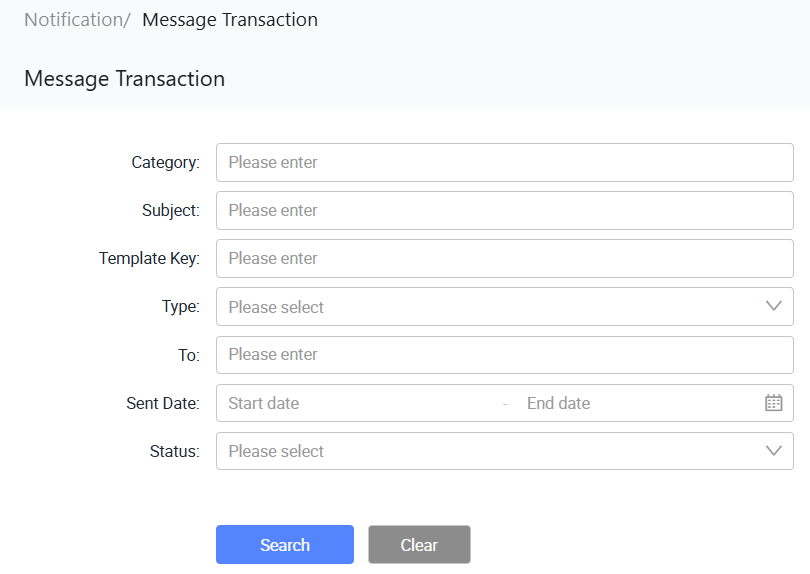
The Notification/ Message Transaction page displays.
-
From here, you can search for message transactions and view transaction details. Each row in the table provides the following action under the Actions column:
- View: Opens the message transaction details in read-only mode.
Search message transactions
To search for message transactions, perform the following:
-
In Notification/ Message Transaction, enter or select the search criteria.
Field Description Category Search for message transactions by category. Subject Search for message transactions by subject. Template Key Search for message transactions by template key. Type Filter message transactions by type, which can be Email or SMS. To Search for message transactions by recipient. Sent Date Filter message transactions by sent date range. Status Filter message transactions by status, which can be Sent or Failed. -
Click Search to find the result.
To clear the search criteria, click Clear.
Last updated on 19 Oct 2026